


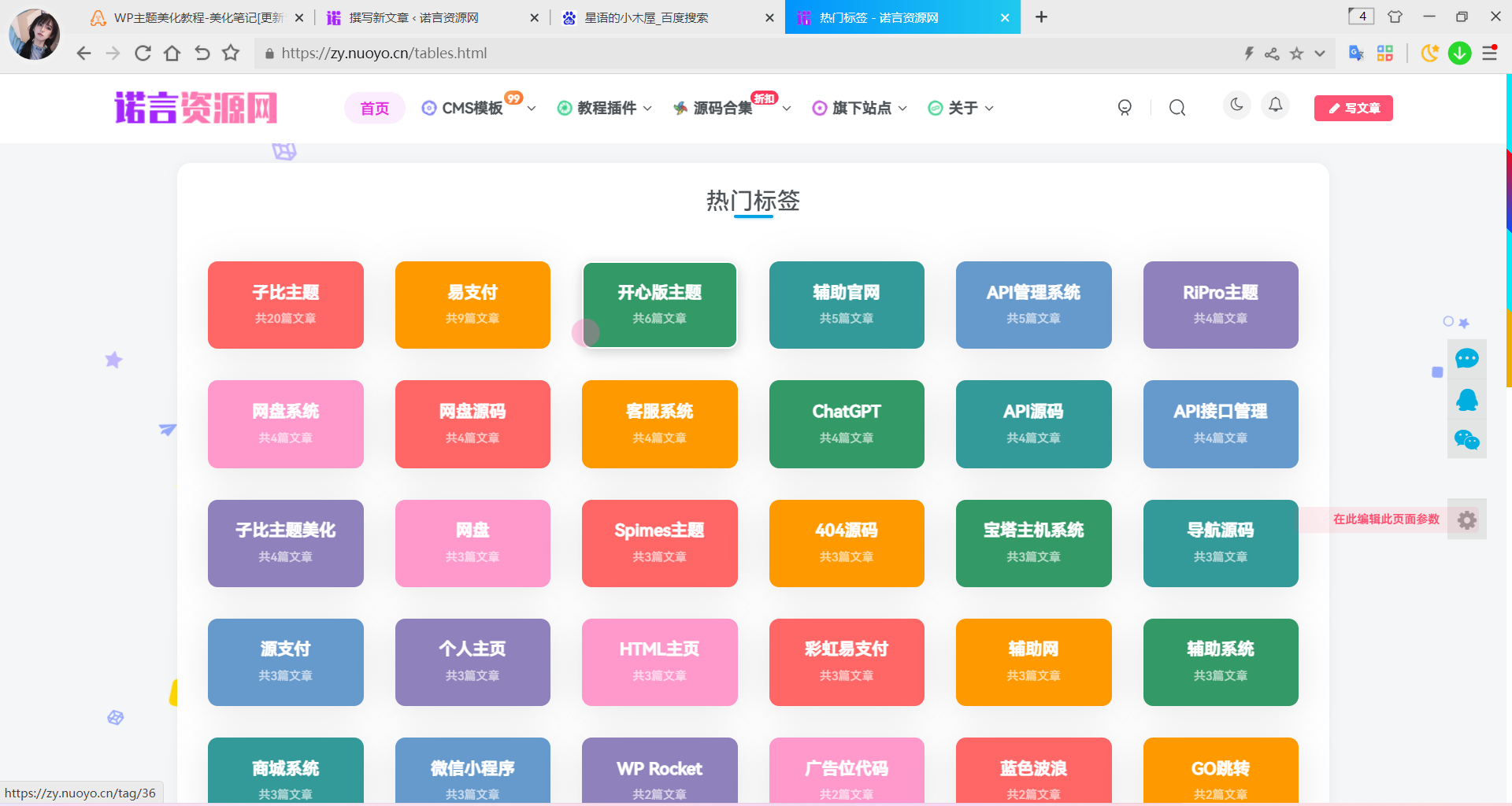
热门标签页面其实很早以前就想做了,但是没有正式学过前端相关的语言,自己写也写不出来,再加自己学业的原因一直没有时间去网上资料,所以就把这件事放到了脑后。昨天考完了试,终于把有时间把网站升了一下级,顺便把热门标签这个页面给弄了一下。自己写不出来,所以热门标签页面的样式借鉴了B2主题的标签聚合页样式进行了一些修改,尽量的适应子比主题,所以昨天一晚上都在弄热门标签页面适配手机端的问题。但还是有一些小小小的不足,熟悉前端的大佬提一下修改的建议。
使用教程
1、进入子比主题目录—>pages这个目录下创建PHP文件,然后把下面的代码添加进去。
- 尝鲜版
<?php /** * Template name: 热门标签页面 * Description: Hot_Tags */ // 获取链接列表 get_header(); $header_style = zib_get_page_header_style(); ?> <main class="container"> <div class="content-wrap"> <div class="content-layout"> <?php while (have_posts()) : the_post(); ?> <?php if ($header_style != 1) { echo zib_get_page_header(); } ?> <div class="box-body theme-box radius8 main-bg main-shadow"> <?php if ($header_style == 1) { echo zib_get_page_header(); } ?> <div class="tagslist tags-page wrapper"> <ul> <?php $tags_count = 60; $tagslist = get_tags('orderby=count&order=DESC&number='.$tags_count); foreach($tagslist as $tag) { echo '<li style="list-style-type:none;"><a class="name box b2-radius b2-mg" href="'.get_tag_link($tag).'"><h2>'. $tag->name .'</h2><small></br><p>共'. $tag->count .'篇文章</p></a></li>';} ?> </ul> </div> <?php wp_link_pages('link_before=<span>&link_after=</span>&before=<div class="article-paging">&after=</div>&next_or_number=number'); ?> <?php endwhile; ?> </div> <?php comments_template('/template/comments.php', true); ?> </div> </div> <?php get_sidebar(); ?> <!--CSS样式--> <style type="text/css"> body{padding: 0px; margin: 0px;} *, *::before, *::after{box-sizing: border-box;} a, abbr, acronym, address, applet, big, blockquote, body, caption, cite, code, dd, del, dfn, div, dl, dt, em, fieldset, figure, font, form, h1, h2, h4, h5, h6, html, iframe, ins, kbd, label, legend, li, object, ol, p, pre, q, s, samp, small, span, strike, strong, sub, sup, table, tbody, td, tfoot, th, thead, tr, tt, ul, var{border: 0; font-family: inherit; font-size: 100%; font-style: inherit; font-weight: inherit; margin: 0; outline: 0; padding: 0; vertical-align: baseline; box-sizing: border-box;} a{cursor: pointer;} a{color: inherit; text-decoration: none; vertical-align: top;} ol, ul{list-style: none;}.wrapper{width: 1142px; max-width: 100%; margin: 0 auto; padding: 0;} .b2-mg{margin: 16px;} .b2-radius{border-radius: 5px;} .box,.side-fixed{background-color: #fff;-webkit-transition: all .2s cubic-bezier(.455,.03,.515,.955); -webkit-box-shadow: 0 0 22px -12px rgba(0,36,100,.3);-moz-box-shadow:0 0 22px -12px rgba(0,36,100,.3);box-shadow: 0 0 22px -12px rgba(0,36,100,.3)box-shadow: 0 0 0 1px #ebebed;box-shadow: 0 1px 3px rgba(26,26,26,.1);box-shadow: 0px 5px 40px -1px rgba(2, 10, 18, 0.1);}/*标签页面*/.tags-page ul{display: flex; flex-flow: wrap;}.tags-page ul li{width: 16.66667%;}.tags-page ul li a{display: block; padding: 20px 10px; text-align: center; border-radius: 10px;}.tags-page ul li a{background-color: #FF6666; border: 2px solid rgba(255, 255, 255, 0);}.tags-page ul li a:hover{box-shadow: 0 3px 10px #ccc; border: 2px solid #fff;}.tags-page ul li:nth-child(7n + 2) a{background-color: #FF9900;}.tags-page ul li:nth-child(7n + 3) a{background-color: #339966;}.tags-page ul li:nth-child(7n + 4) a{background-color: #339999;}.tags-page ul li:nth-child(7n + 5) a{background-color: #6699CC;}.tags-page ul li:nth-child(7n + 6) a{background-color: #8f82bc;}.tags-page ul li:nth-child(7n + 7) a{background-color: #FF99CC;}.tags-page ul li h2{display: -webkit-box; -webkit-box-orient: vertical; -webkit-line-clamp: 1; height: 25px; overflow: hidden; margin-bottom: -20px; font-weight: 800; font-size: 17px; color: #fff;}.tags-page ul li p{font-size: 12px; color: rgba(255, 255, 255, 0.63);}.tags-page h1{font-size: 28px; text-align: center; margin: 30px 0;}@media screen and (max-width: 768px){.tags-page ul li{width: 50%;} .tags-page h1{margin: 20px 0;} .tags-page ul li a{padding: 10px 5px;}} </style> </main> <?php get_footer(); - 修改版(最终版)
- 本站推荐使用的版本,php文件暂时没时间上传,请复制粘贴即可,谢谢。
<?php

/**
 * Template name: WIIUII-热门标签页面
 * Description:   WIUII - Hot_Tags
 */

// 获取链接列表
get_header();
$header_style = zib_get_page_header_style();
?>
<main class="container">
    <div class="content-wrap">
        <div class="content-layout">
            <?php while (have_posts()) : the_post(); ?>
                <?php if ($header_style != 1) {
                    echo zib_get_page_header();
                } ?>
                <div class="box-body theme-box radius8 main-bg main-shadow">
                    <?php if ($header_style == 1) {
                        echo zib_get_page_header();
                    } ?>
                    <div class="tagslist tags-page wrapper">
                        <ul>
                          <?php
                            $tags_count = 60;
                            $tagslist = get_tags('orderby=count&order=DESC&number='.$tags_count);
                            foreach($tagslist as $tag) {
                              echo '<li style="list-style-type:none;"><a class="name box b2-radius b2-mg" href="'.get_tag_link($tag).'"><h2>'. $tag->name .'</h2><small></br><p>共'. $tag->count .'篇文章</p></a></li>';}
                          ?>
                        </ul>
                    </div>
                    <?php wp_link_pages('link_before=<span>&link_after=</span>&before=<div class="article-paging">&after=</div>&next_or_number=number'); ?>
                <?php endwhile;  ?>
                </div>
                <?php comments_template('/template/comments.php', true); ?>
        </div>
    </div>
    <?php get_sidebar(); ?>
<!--CSS样式-->
  <style type="text/css">
 .wrapper{/*width: 1142px; max-width: 100%;*/ margin: 0 auto; padding: 0;} .b2-mg{margin: 16px;} .b2-radius{border-radius: 5px;} .box,.side-fixed{background-color: #fff;-webkit-transition: all .2s cubic-bezier(.455,.03,.515,.955); -webkit-box-shadow: 0 0 22px -12px rgba(0,36,100,.3);-moz-box-shadow:0 0 22px -12px rgba(0,36,100,.3);box-shadow: 0 0 22px -12px rgba(0,36,100,.3)box-shadow: 0 0 0 1px #ebebed;box-shadow: 0 1px 3px rgba(26,26,26,.1);box-shadow: 0px 5px 40px -1px rgba(2, 10, 18, 0.1);}/*标签页面*/.tags-page ul{display: flex; flex-flow: wrap;}.tags-page ul li{width: 16.66667%;}.tags-page ul li a{display: block; padding: 20px 10px; text-align: center; border-radius: 10px;}.tags-page ul li a{background-color: #FF6666; border: 2px solid rgba(255, 255, 255, 0);}.tags-page ul li a:hover{box-shadow: 0 3px 10px #ccc; border: 2px solid #fff;}.tags-page ul li:nth-child(7n + 2) a{background-color: #FF9900;}.tags-page ul li:nth-child(7n + 3) a{background-color: #339966;}.tags-page ul li:nth-child(7n + 4) a{background-color: #339999;}.tags-page ul li:nth-child(7n + 5) a{background-color: #6699CC;}.tags-page ul li:nth-child(7n + 6) a{background-color: #8f82bc;}.tags-page ul li:nth-child(7n + 7) a{background-color: #FF99CC;}.tags-page ul li h2{display: -webkit-box; -webkit-box-orient: vertical; -webkit-line-clamp: 1; height: 25px; overflow: hidden; margin-bottom: -20px; font-weight: 700; font-size: 17px; color: #fff;}.tags-page ul li p{font-size: 12px; color: rgba(255, 255, 255, 0.63);}.tags-page h1{font-size: 28px; text-align: center; margin: 30px 0;}@media screen and (max-width: 768px){.tags-page ul li{width: 50%;} .tags-page h1{margin: 20px 0;} .tags-page ul li a{padding: 10px 5px;}}.b2-radius:not(article){transition: all 0.3s;}.b2-radius:not(article):hover{transform: translateY(-10px);}
  </style>
</main>
<?php
get_footer();
2、把上面的代码添加进行保存后,进入到后台—>页面—>新建页面—->选择热门标签页面即可使用。
效果截图
感谢您的来访,获取更多精彩文章请收藏本站。

© 版权声明
1、本内容转载于网络,版权归原作者所有!
2、本站仅提供信息存储空间服务,不拥有所有权,不承担相关法律责任。
3、本内容若侵犯到你的版权利益,请联系我们,会尽快给予删除处理!
4、本站全资源仅供测试和学习,请勿用于非法操作,一切后果与本站无关。
5、如遇到充值付费环节课程或软件 请马上删除退出 涉及自身权益/利益 需要投资的一律不要相信,访客发现请向客服举报。
6、本教程仅供揭秘 请勿用于非法违规操作 否则和作者 官网 无关
THE END